
Describe
Tell the agent the result you need in plain English.
 Invisible HandBrowser work, done.
AI BROWSER AUTOMATION
Use AI to navigate websites, move data, download reports, and complete repetitive browser tasks in the session you already use—without building an integration first.
HOW IT WORKS
Invisible Hand is designed for the awkward work between tools: tasks that are too repetitive to keep doing by hand, but too small or changeable for a formal integration project.
Tell the agent the result you need in plain English.
Follow the active tab, current action, downloads, and progress.
Review text entry, submissions, and critical actions before they happen.
A REAL BROWSER WORKFLOW
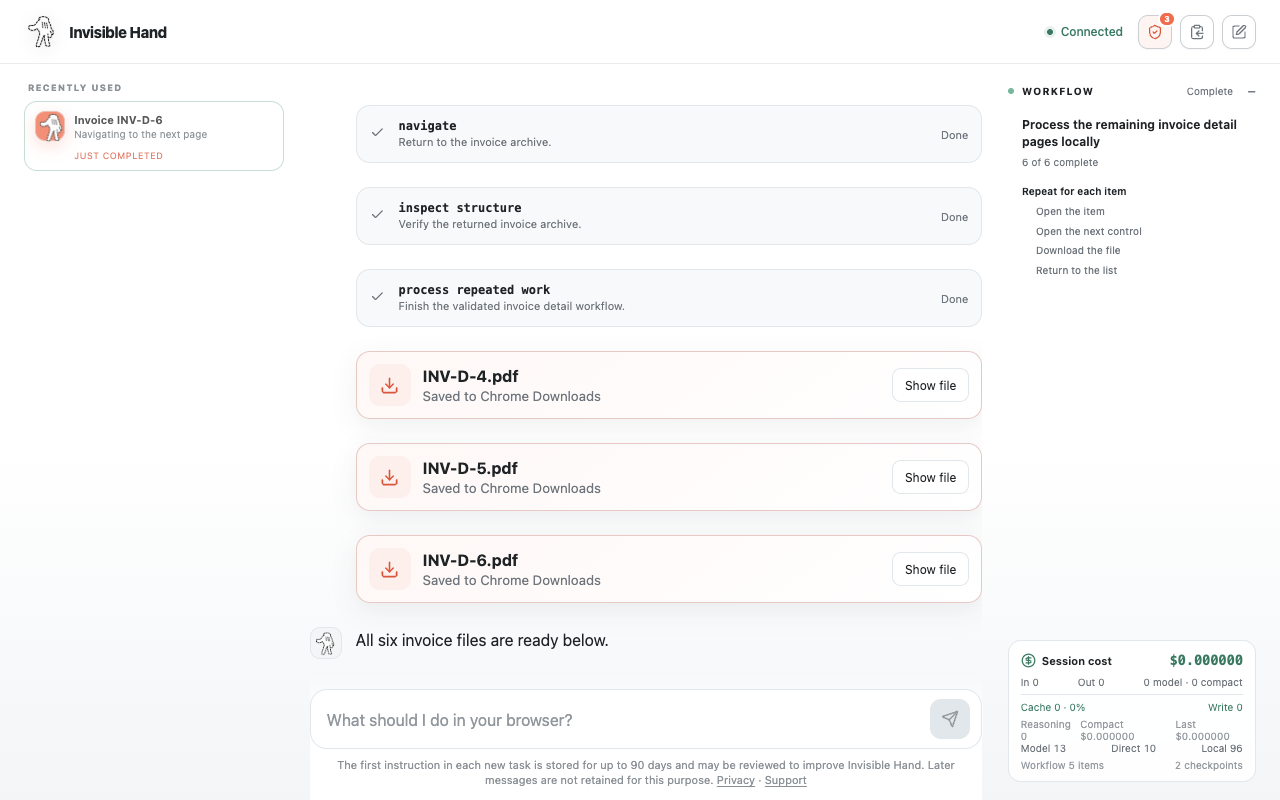
The agent can inspect a repeated record pattern, download the matching files, and present the finished artifacts in the conversation.
CONTROL AND LIMITS
Browser automation complements APIs and workflow platforms. It is most useful when the work lives in a web interface, setup needs to stay light, and a person should remain in control.
FREQUENTLY ASKED QUESTIONS
Browser automation uses software to navigate pages and perform repeatable web actions such as inspecting records, clicking controls, entering regular text, and downloading files.
Use browser automation when the task already works through a web interface, an API is unavailable or impractical, and the volume does not justify a larger integration project.
Yes. The controller shows the current work and lets you stop the run at any time.
START WITH ONE TASK
Install Invisible Hand, open the controller, and describe the browser work you want completed.
Add Invisible Hand to Chrome